Troubleshooting
IDF_PATH is not set
You are not in an ESP-IDF exported shell.
- Windows: open ESP-IDF PowerShell
- Linux/macOS: source
export.sh - In VS Code, prefer the ESP-IDF extension over generic
CMake Tools - If
CMake Toolslogs an include failure for/tools/cmake/project.cmake, it launched without the ESP-IDF environment
BIN not found
Make sure your build succeeded and the binaries exist:
build/vigilant-engine.binbuild/recovery/vigilant-engine-recovery.bin
Port or permission errors
- Close serial monitors (for example
idf.py monitor) before flashing - Verify the serial port is correct
Always booting into the wrong partition
Use otatool.py to select the correct slot:
python $IDF_PATH/components/app_update/otatool.py --port /dev/ttyACM0 switch_ota_partition --slot 0
Flash size mismatch
flash.py runs idf.py reconfigure, which rebuilds sdkconfig from sdkconfig.defaults. Set the
correct flash size in sdkconfig.defaults so rebuilds keep the proper values.
IntelliSense highlighting freertos libraries red
In vscode: Ctrl+Shift+P to open command palette, then run: > ESP-IDF: Add VS Code Configuration Folder
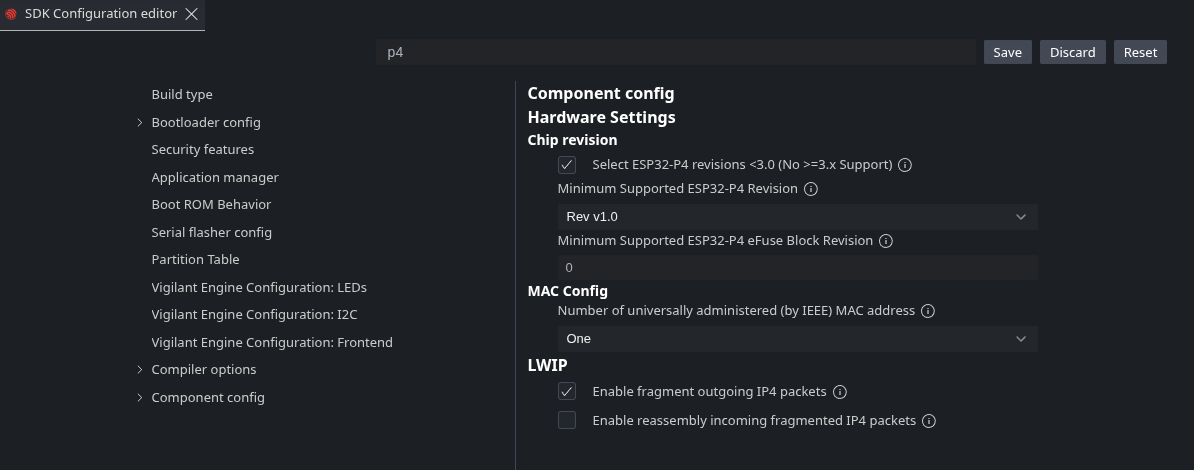
esp32p4 chip revision mismatch
Some esp32p4 chips are of older chip revisions. If this is the case, you will get the following error:
A fatal error occured: 'bootloader/bootloader.bin' requires chip revision in range [v3.1 - v3.99] (this chip is revision v1.3). Use the force argument to flash anyway.
To fix this, run menuconfig and set the chip revision like this: